


What is a Process?
Contents
ToggleWhat is a process ? It is a program in execution. For example, we write a program in c language. That program is written in a high level language. Computers do not understand high level language. It only understands binary code which are 0 and 1. So the program has to be converted to binary code . So for that , using a compiler helps to convert that program into machine code.
But it is not enough to just have that binary code for a program to execute. So , it has to be loaded into the main memory for the program to execute. Also it may need some resources of the computer which will be allocated by the OS .
Here, OS will help loading the program into the main memory and assign resources that are required and then the program will begin its execution. The program is a passive entity , but as soon as it begins execution it becomes a process. So , a program in execution is called a process.
Process in Memory
When a process starts running, it doesn’t just float around, it gets loaded into the computer’s main memory (RAM) in a structured way so the CPU can access everything quickly. The operating system handles this loading, carving out space for the process’s parts like code, data, and control info, all while keeping things isolated from other processes to avoid crashes.
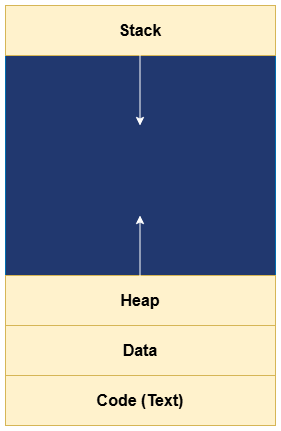
Key Components of a Process in Memory:-
Text Segment (Code Area): This is where the program’s instructions live, loaded read-only into a fixed part of memory so it can’t get altered accidentally during runs. The CPU fetches lines from here sequentially, jumping only as the program directs, keeping execution predictable and secure.
Data Segment: Holds the process’s global and static variables, split into initialized parts (with set values) and uninitialized ones (starting at zero). It’s persistent memory that survives function calls, storing things like counters or constants the whole program uses, loaded at startup and updated as needed.
Stack Segment: A dynamic, growing/shrinking area for local variables, function parameters, and return addresses—last in, first out style for handling nested calls like recursion. It starts small and expands downward in memory as functions nest deeper, popping back when they finish to free space instantly.
Heap Segment: For runtime memory needs, like dynamic arrays or objects created on the fly; it grows upward as the process requests more via code, with the OS allocating from free blocks. It’s flexible but can fragment if not managed well, so garbage collection or manual frees keep it tidy.
Process Control Block (PCB) in Memory: Not part of the process’s user space but stored by the OS in kernel memory, this holds metadata like the process ID, current state, registers, and memory pointers. It acts as the dashboard, updated on every context switch so the OS knows where to resume the process.