


Types of Operating System
Contents
ToggleOperating systems come in various forms, each designed to handle specific needs like running simple tasks on old mainframes or powering the smartphone’s multitasking. Think of them as different vehicles: a truck for heavy loads (like servers), a sports car for speed (real-time systems), or a family van for everyday use (desktop OS).
1.Batch Operating System
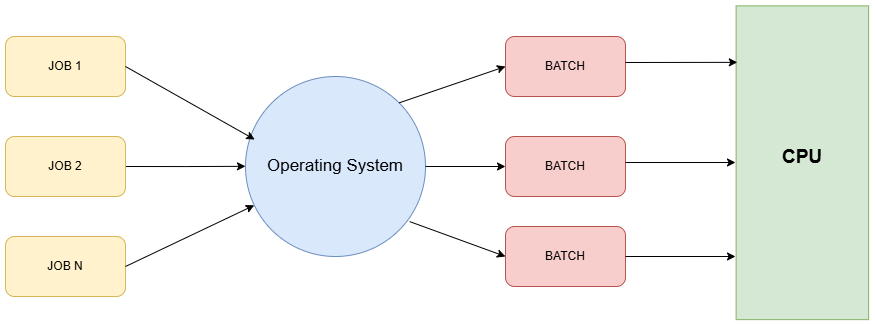
Batch OS is one of the oldest types, popular back in the 1950s and 1960s when computers were huge and expensive. Jobs (like payroll calculations or data reports) get grouped into batches by the OS, then processed one after another without needing human input in between. It’s like a factory assembly line: everything’s queued up, and the machine chugs through the pile efficiently, but slowly for interactive stuff. No multitasking here. The CPU stays busy until the batch finishes, which saves time on repetitive tasks but means users wait around.
Advantage – Great for long, non-urgent jobs where speed comes from automation. Disadvantage – Not ideal for quick queries since there’s no real-time response.
Examples include early IBM systems like OS/360, still used in some legacy banking setups for bulk transactions.
2.Multiprogramming Operating System
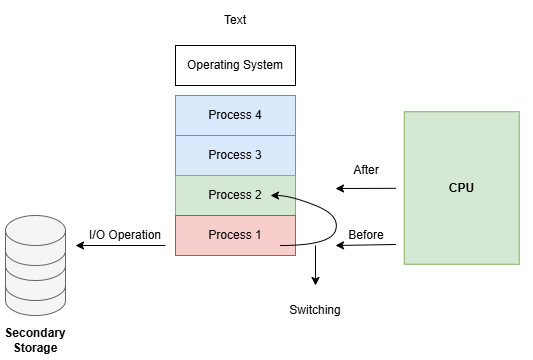
Multiprogramming is an extension to batch processing where , the OS keeps multiple programs loaded in memory at the same time, so the CPU doesn’t sit idle waiting for one slow task . When one program waits for input (say, from a slow disk), the OS switches to another process, making the whole system faster and more efficient. It can be said as context switching It’s the base for modern multitasking, but users still share the machine without real-time switching. Common in early mainframes, now evolved into better systems.
Real Life Example : Multiprogramming feels like a busy call center where agents (programs) handle calls, but when one waits for customer details, another jumps in; keeps the lines moving without idle time, boosting productivity.
3.Multiprocessing Operating System
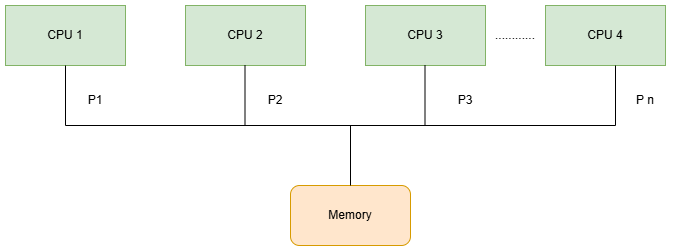
An operating system that uses many CPUs to boost performance is known as a multiprocessing operating system. Multiprocessing operating system uses multiple CPUs (processors) in one machine to handle tasks in parallel. The OS coordinates these processors, which can be symmetric (all equal, like SMP) or asymmetric (one master). It boosts speed for heavy jobs like video editing or scientific simulations, but needs good communication between CPUs to avoid bottlenecks. Servers often use this. The most popular multi-processing operating systems are Solaris, LINUX, and UNIX.
4. Real-Time Operating System
Designed for tasks that must respond instantly, without delays—like an ATM machine spitting cash in seconds or a car’s airbag deploying on crash. There are hard RTOS (strict deadlines, e.g., medical devices) and soft RTOS (flexible, e.g., video streaming). The OS prioritizes critical processes and minimizes interruptions, often in embedded systems. No room for “later”—it’s all about predictability.
5. Distributed Operating System
This OS spreads tasks across multiple connected computers acting as one big system. The OS manages resources over a network, hiding the complexity so users see a single machine. Great for cloud computing or big data, but tricky with network failures. Examples include Amoeba or modern clusters.
6. Network Operating System
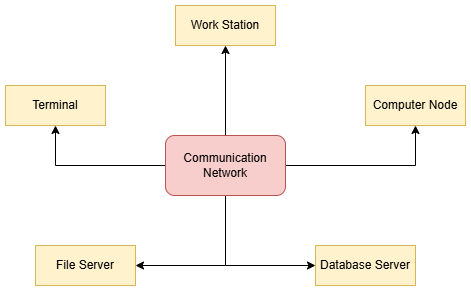
This runs on servers to manage networked computers, like the admin in a housing society coordinating water, electricity, and security for all flats. It handles file sharing, printer access, and user logins over LAN/WAN, but each machine runs its own OS. Focuses on communication protocols; Windows Server or Novell NetWare are classics. Not fully transparent like distributed—users know they’re on a network.