


Operating System Services
Contents
Toggle1. User Interface
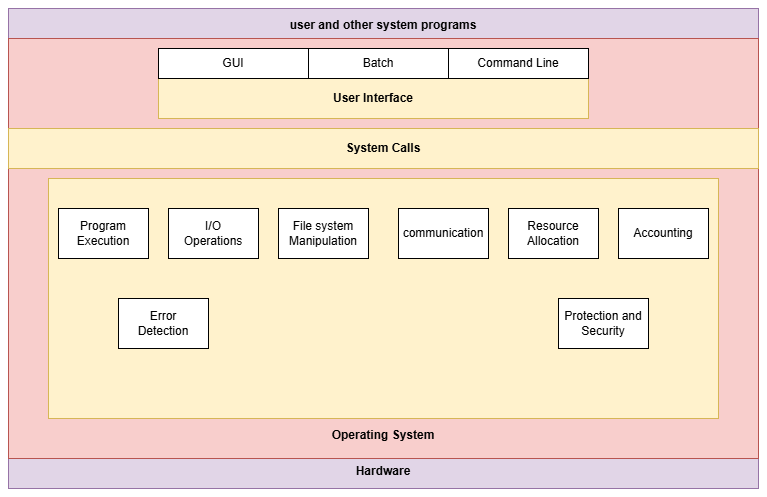
Operating System Services as follows:
Every operating system has an user interface. One is command-line interface and the other one is batch interface. The most common is Graphical User Interface (GUI).
Command-line Interface uses text commands to operate. These commands come in a particular format with options. In batch interface commands are stored in files and directives and executed. GUI which is the most common interface is a window system interface that utilizes a pointing device (such as a mouse or trackpad) to facilitate user interaction and direct I/O. It presents graphical icons and visual indicators to the user, allowing for direct manipulation of objects rather than requiring text-based commands.
- Windows: Rectangular areas of the screen where applications run and display content.
- Icons: Small images that represent files, folders, or programs.
- Menus: Lists of options or commands available within an application.
- Pointing Device: A device (like a mouse, trackball, or touchpad) used to control an on-screen cursor for selecting items, navigating, and interacting with interface elements.
2. Program Execution
The operating system loads a program into the memory to run that program and the program must be able to execute normally or with an error.
The operating system provides an environment for executing programs. For example, when a user types a program in languages such as C, Java, or Python and saves it, the operating system stores this program on the hard disk. During the compilation of the program, it resides on the hard disk. However, when the program is executed, the operating system transfers it from the hard disk to the main memory (RAM). Once the execution is complete, the operating system moves the program back from the main memory to the hard disk.
3. Input / Output Operations
When a program is in execution , it may require an I/O device or a file. It is the responsibility of the operating system to allocate the I/O device or file to the corresponding program. For example , taking a printout. It is the duty of the OS to allocate the printer to the corresponding program.
4. File System Manipulation
A File System is a collection of directories. The directories may contain subdirectories, and further, they may contain a collection of files. Programs usually read, write files and directories. They may even need to create and delete files, search for a file. An operating system also includes permission management to allow or deny access to files and directories. It also keeps a track of every status of files and directories based on their creation , deletion or transfer. An OS also maintains data integrity by protecting against unauthorized access. So, an operating system is involved in file system manipulation.
5. Communication
Certain situations arise in which one process needs to exchange information with another process. For example , communications may occur between process that are executing on the same computer or different computer systems tied together by a computer network. These process can communicate via shared memory or message passing.
i) In case of shared memory multiple processes dip into the same pool of RAM to read or update
ii) In case of message passing, the OS acts as a reliable courier, shuttling neatly packaged bits of data (like predefined messages or packets) from one process to another. This is especially handy for distant processes, avoiding the mess of shared spaces and letting the system handle the delivery securely.
6. Error Detection
Errors keep on occurring in a computer system. Errors can occur in the CPU and in the memory (such as a power cut), in I/O devices (such as lack of ink or paper in the printer) and also in user programs ( such as unauthorized access of any illegal memory locations or high use of CPU time ). It is the responsibility of an operating system to detect and correct errors constantly. In certain errors operating system has to halt the system and sometimes the operating system terminates a process which was causing the error and the system or the user has to execute the process again.
7. Resource Allocation
It is the duty of the operating system to allocate resources to each running process. The operating system manage different types of resources such as CPU, main memory , I/O devices and file storage etc. The operating system has certain rules called the CPU scheduling algorithms which are used in determining the best use of CPU, which processes are to be executed first , which processes should get the priority and needs of the I/O devices (like printers) . The OS also checks available registers.
8. Accounting
The operating system also keeps a track of users and processes and their usage of resources enabling performance analysis, security (auditing), and efficient resource management, by keeping detailed logs of system activities, login times, and resource consumption. It’s about monitoring who uses what resources and for how long, ensuring system stability and optimizing performance