


Contents
ToggleOperating System

Operating System is a software that acts as a bridge between you (or other programs) and your computer’s hardware. Think of it like the manager of a bustling apartment building. The hardware—your processor, memory, hard drive, and screen—is the building itself, full of rooms and utilities. Without a manager, tenants (that’s you and your apps) would struggle to book rooms, pay bills, or fix leaks. The OS handles all that coordination, making sure everything runs smoothly without you noticing the chaos underneath.
In technical terms, the OS manages resources efficiently. It decides which programs get CPU time, allocates memory for tasks, and controls input/output devices like your keyboard or printer. For beginners, this means the OS turns raw machine power into something usable, like how your smartphone’s OS lets you swipe through photos without manually telling the screen pixels where to light up. Advanced learners might appreciate that this resource management prevents conflicts—imagine two apps fighting over the same memory space; the OS steps in as a referee.
An operating system is a software that acts as a bridge or an interface between a computer’s hardware (processor, memory, storage) and the user or the applications. It is a program that manages a computer’s hardware. It manages resources efficiently, ensuring tasks like browsing the web, editing documents, or playing games run smoothly without conflicts.
For example, a manager in a busy office allocates desks (memory), schedules meetings (processes), and handles mail (input/output).
Popular examples include Windows for PCs, macOS for Apple devices, Linux for servers, and Android or iOS for mobiles. Without an OS, your device would be as useless as a car without an engine, unable to start or respond.
What Exactly Is an Operating System?
Imagine turning on a computer and everything just works. We click an app, music starts playing, and files pop up without a hitch. Behind this seamless experience is the operating system (OS), the invisible conductor orchestrating the device’s hardware and software. If you’ve ever wondered what makes your phone juggle calls, emails, and games all at once, or why your computer freezes when you open too many tabs, you’re in the right place. This tutorial dives into the basics of operating systems, explaining them in simple terms for beginners while touching on deeper concepts for those ready to level up. We’ll explore what an OS is, its key functions, types, and why it matters in everyday tech life—no jargon overload, just clear insights with real-world ties.
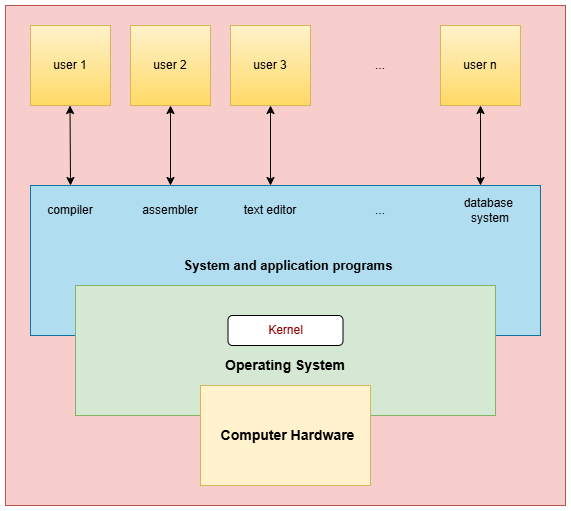
The components of an operating system work together to manage hardware, software, and user interactions efficiently, forming the foundation for smooth device operation. Below is a list of key components, each with a short description tailored for beginners while noting advanced roles.
- Kernel: The heart of the OS, acting as the central mediator between applications and hardware; it handles low-level tasks like process scheduling, memory allocation, and device control to ensure stability and security.
- User Interface (Shell): Provides the interaction layer, either graphical (icons and windows) or command-line, translating user inputs into system actions and displaying outputs for easy navigation. This is the place where the user runs the application program.