

Basic Organization of a Digital Computer
Contents
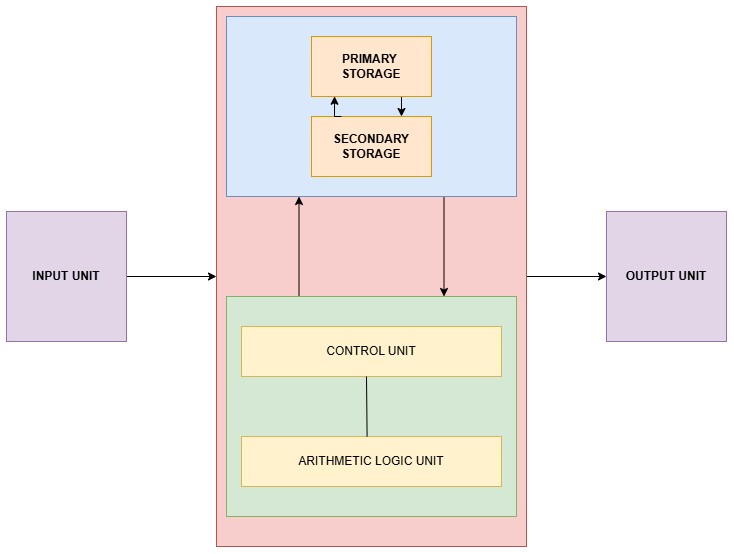
ToggleA digital computer follows a basic organization with five key components. Input unit, memory unit, ALU, control unit, and output unit. These are connected via a system bus for smooth data flow. This structure, rooted in Von Neumann architecture, powers everything from laptops to smartphones.
Firstly, understanding this setup helps students grasp how devices process tasks efficiently. For instance, when you type on a keyboard, input travels through the bus to memory, gets computed by the CPU, and displays on screen. This article breaks it down with real-life examples.
1. Input Unit: Gateway for Data
The input unit captures external data into digital form for processing. Common devices include keyboards, mice, scanners, and touchscreens. It converts analog signals (like the finger swipe over phone screen ) into binary code that the computer understands.
The input unit captures external data into digital form for processing. Common devices include keyboards, mice, scanners, and touchscreens. It converts analog signals like your finger swipe into binary code the computer understands.
Furthermore, high-speed inputs like game controllers ensure lag-free gaming by buffering data quickly. Thus, input sets the stage for all operations
2. Memory Unit: Storage Backbone
Memory unit holds data and instructions temporarily (RAM) or permanently (ROM, HDD/SSD). Primary memory (RAM) stores active programs, while secondary handles long-term files. It uses addresses for quick access.
Consider a laptop editing a video: RAM loads the software and footage frames for instant edits, preventing slowdowns. If RAM fills, it swaps to slower SSD via virtual memory. Real-life: Streaming Netflix buffers episodes in RAM for smooth playback.
Moreover, cache memory is a super-fast subset that sits near the CPU to predict and preload data, slashing wait times in apps like Photoshop. This hierarchy keeps systems responsive.
3. Arithmetic Logic Unit (ALU): Computation Powerhouse
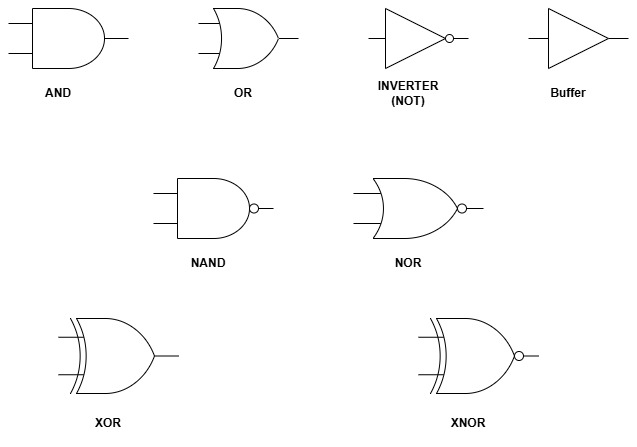
The ALU performs arithmetic (add, subtract, multiply) and logical operations (AND, OR, comparisons). It processes raw numbers from registers, producing results for storage. Every calculation, from banking apps to game physics, happens here.
For instance, in a fitness tracker, the ALU tallies steps by adding sensor data hourly. During online shopping, it compares prices logically to find deals. Advanced ALUs in GPUs handle vector math for 3D rendering in movies.
However, speed matters. The carry-lookahead adders in modern ALUs reduce delays, enabling billions of operations per second in servers.
4. Control Unit: The Orchestrator
The control unit (CU) directs operations by decoding instructions and sending signals. It fetches from memory via the program counter, coordinates ALU tasks, and manages data flow. Think of it as a conductor in an orchestra.
In a self-driving car, the CU sequences sensor data processing: fetch image, ALU analyzes obstacles, then output alerts. Without CU, components act randomly. Real-life: Washing machines use simple CUs for cycle timing.
Additionally, it handles interrupts like pausing music for a call, ensuring priority tasks run first.
5.Output Unit and System Bus: Results and Connections
Output units display results via monitors, printers, or speakers, converting binary back to human-readable form. The system bus ties everything: data bus for info, address bus for locations, control bus for signals.
Picture gaming: ALU computes frames, CU routes via bus, output renders on screen at 60 FPS. In ATMs, output prints receipts post-transaction. Buses prevent bottlenecks, like highways linking cities.
Modern PCIe buses speed GPU data for VR, making experiences immersive.
How Components Interact: Von Neumann Flow
Components collaborate in an instruction cycle: fetch (memory to CU), decode (CU analyzes), execute (ALU computes), store (back to memory). Buses enable this loop at gigahertz speeds.
Real-life example: In Google search when an input query is given , memory loads index, ALU ranks results, output shows page. Disruptions, like low RAM, cause crashes. Multi-core setups parallelize for efficiency.
This timeless organization scales from smartwatches to supercomputers.
Real-Life Applications in Daily Tech
Smartphones embody this: Touch input feeds multi-core CPU (ALU+CU), RAM juggles apps, OLED output shines videos. EVs use it for battery management, the ALU calculates range, output dashboards stats.
In hospitals, MRI machines process scans via high-speed ALUs and vast memory. Cloud servers stack thousands for Netflix scalability. Mastering this aids your projects, like code compilers needing efficient execution.
FAQ
What are the five basic components of a digital computer?
Input unit, memory unit, ALU, control unit, and output unit, linked by system bus.
How does the system bus connect components?
Data bus transfers info, address bus locates data, control bus sends signals.
Give a real-life example of ALU usage.
Fitness trackers add daily steps using arithmetic operations.
Why is memory hierarchy important?
It balances speed and capacity—cache for quick access, SSD for storage.
What role does the control unit play?
It decodes instructions and coordinates all operations like a traffic cop.
How does Von Neumann architecture relate?
It defines stored-program concept using these components for modern computers.