

Von Neumann Architecture Explained
Contents
ToggleVon Neumann Architecture forms the backbone of modern computers, storing both data and instructions in a single memory while using a CPU with ALU, control unit, accumulator, I/O devices, and buses for sequential execution. Proposed by John von Neumann in 1945, still used in modern PCs. It powers laptops, phones, and servers even today.
This design revolutionized computing by enabling stored programs—load code once, run anywhere. Unlike fixed-function machines like calculators, it handles diverse tasks efficiently.
Moreover, despite the “Von Neumann bottleneck” from shared memory access, optimizations like caching keep it relevant.
Core Components of Von Neumann Architecture
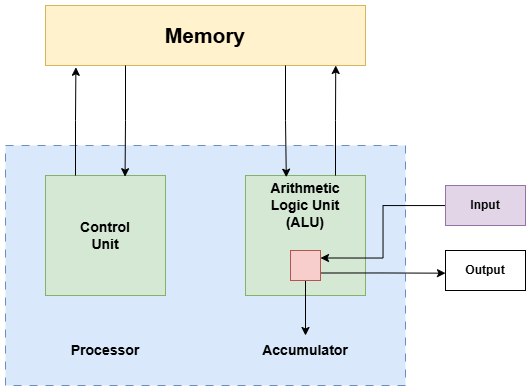
The architecture revolves around five main elements: memory, CPU (ALU + control unit + accumulator), I/O devices, and buses. These interact via a fetch-decode-execute cycle, processing billions of instructions per second.
For instance, when browsing the web, memory holds the page code, CPU computes layouts, and I/O displays results. This integrated setup ensures reliability across devices. Additionally, registers like the program counter (PC) track instruction flow. It is also known as the Instruction Set Architecture (ISA).
1. Memory Unit: Shared Storage for Data and Instructions
Memory stores both programs and data in one addressable space, a hallmark of Von Neumann. It includes RAM for volatile operations and secondary storage like SSDs for persistence. Addresses via buses fetch bytes quickly.
Consider Netflix streaming: Memory loads app instructions alongside video buffers. If full, swapping slows playback—hence 16GB RAM recommendations. Real-life: In ATMs, memory holds transaction code and user PINs securely.
Furthermore, this unity simplifies programming but creates contention, solved by multi-level caches in modern Intel chips.
2. Processing Unit: ALU, Control Unit, and Accumulator
The CPU splits into ALU for math/logic, control unit (CU) for orchestration, and accumulator for results. ALU adds numbers or compares bits; CU decodes instructions; accumulator holds intermediates.
In a calculator app, ALU sums inputs (e.g., 5+3), CU sequences steps, accumulator stores 8 temporarily. Gaming example: Fortnite’s physics engine uses ALU for collision detection, accumulating velocities frame-by-frame.
Moreover, registers like PC (next instruction address) and instruction register (IR) speed this up, enabling gigahertz clocks. Without them, execution halts.
3. Accumulator : A type of Register
Accumulator is a type of register that stores data in single bit. It stores the calculations made by ALU.
4. Input/Output (I/O) Devices: Bridging the External World
I/O devices handle user interaction—keyboards/mice for input, screens/printers for output. They connect via buses, converting signals to binary.
Picture typing an email: Keyboard inputs text to memory, CPU processes, monitor outputs. In self-driving cars, cameras (input) feed images to ALU for object recognition, speakers (output) alert drivers.
Direct memory access (DMA) bypasses CPU for fast I/O, like SSD reads in video editing.
5. Buses: Data Pathways Connecting Everything
Buses link components: address bus specifies memory locations, data bus carries info, control bus sends signals (read/write). Often combined in a system bus.
During file downloads, address bus locates storage spots, data bus transfers chunks, control bus coordinates. High-speed PCIe buses in GPUs handle 4K gaming data without lag. Real-life: USB buses connect phones to chargers, managing power/data flow.
How Von Neumann Works: Fetch-Decode-Execute Cycle
The cycle repeats. CU fetches instruction (PC to memory via address bus), decodes it, ALU executes using accumulator, results store back. Buses shuttle everything.
Example: Google search—fetch query code, decode keywords, ALU ranks results, I/O displays page. Interrupts pause for calls, resuming seamlessly. This sequential flow scales to multicore via parallelism.
Drawback of Von Neumann Architecture -The Von Neumann Bottleneck
Von Neumann shines in simplicity. Universal memory eases software portability. However, bus contention slows data/instruction fetches, and the “Von Neumann bottleneck” problem arises.
The CPU processes data and instructions at a much higher pace , because it used registers which is setup in the CPU. It is an essential component of a CPU. The registers are very fast. But the main memory is slow than the CPU. So , it provides data and instruction to the CPU at a much slower rate. This creates a time lag between the data and instruction provided by the main memory to the CPU.
As a result, the whole performance decreases. The performance decreases because it does not get the data and instruction from the main memory at the pace at which the CPU requires to process it. So , there arises a phenomenon which is known as the Von Neumann Bottleneck.
Von Neumann is actually the speed disparity between the CPU and the memory.
Now the Question arises that “how to resolve this issue?”
1. To resolve the issue, sometimes cache memory is used instead of main memory or it is installed between CPU and main memory. Cache memory is a memory which has exactly the same speed as that of the CPU. As a result, the cache memory provides data and instruction to CPU at the same rate at which it requires , thus eliminating the bottleneck problem.
2. Another way is to implement RISC architecture. RISC stands for Reduced Instruction Set Computer. It uses a lot of registers within it. These registers are set up within this architecture set and they do not make enough access to the memory. Here the access to the main memory is reduced.
Most of the time when there is a need to process data and instructions it uses the registers. As a result the performance does not decrease and the Von Neumann bottleneck problem does not arise in this system.
FAQ
What defines Von Neumann Architecture?
Single shared memory for data/instructions, CPU with ALU/CU/accumulator, buses for connections, sequential execution.
How does the address bus differ from data bus?
Address bus locates memory spots; data bus transfers actual content.
Role of accumulator in Von Neumann?
Stores ALU operation results temporarily before memory write.
Real-life example of Von Neumann bottleneck?
Slow multitasking on low-RAM PCs due to shared memory access.
Why use control bus?
Carries signals like read/write to coordinate components.
Von Neumann vs Harvard difference?
Von Neumann shares memory; Harvard separates for faster access.